
The app and store must share one Shopify organization.
- Sign in to the Shopify organization that owns the target store.
- Create the app in that same organization.
What you need
- A Shopify user with App developer access who can create and configure the app.
- A store owner or administrator with permission to install apps on the target store.
- Access to the Shopify Dev Dashboard for the organization that owns the store.
- A Permute workspace where you can create connectors.
1. Create the Shopify app
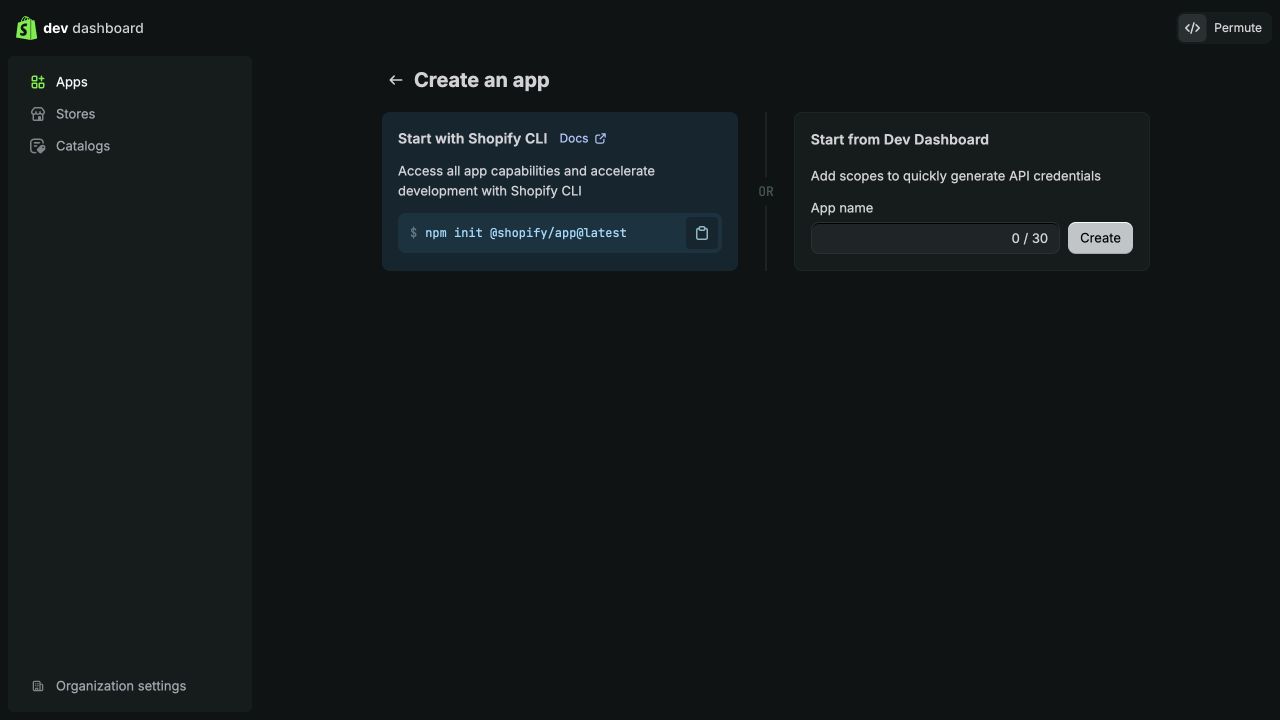
- Open the Shopify Dev Dashboard.
- Confirm the target store appears under Stores in the same organization.
- Select Apps, then Create app.
- Under Start from Dev Dashboard, name the app. For example, “Permute Data Connector.”
- Select Create.
2. Configure an app version
- Open Versions and select Create version.
- Set App URL to
https://shopify.dev/apps/default-app-home. - Turn off Embed app in Shopify admin.
- Leave Use legacy install flow turned off so Shopify manages installation.
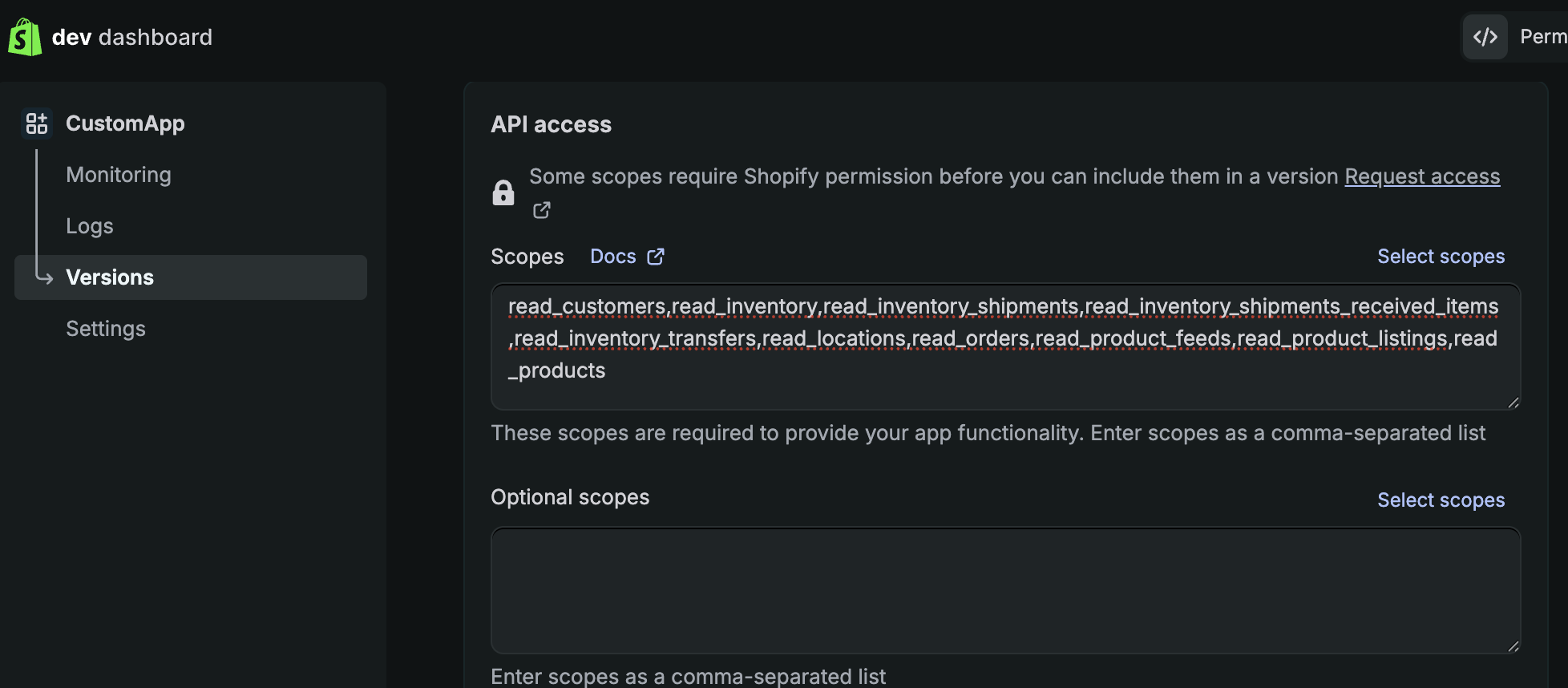
- Paste the scopes below into Shopify's main Scopes field, including
read_all_orders. - If Shopify shows Invalid scopes:
- Open Select Scopes.
- Close the popup.
- The error clears and the pasted scopes remain. That is a Shopify display bug.
- Leave Shopify's Optional scopes field empty.
- Select Release.
Minimum connection scopes
- These five scopes are required.
- The connector rejects the connection if any one is missing.
read_products,read_inventory,read_locations,read_orders,read_customers
Recommended broad-access scopes
- Use the complete list below for the highest-coverage integration.
- These permissions are read-only.
- Permute does not request Shopify write scopes.
Include
read_all_orders.- Same-organization custom apps can add this scope without a Shopify security review.
- Without it, the first sync will only include the last 60 days of orders.
read_products,read_inventory,read_locations,read_orders,read_customers,read_all_orders,read_draft_orders,read_returns,read_discounts,read_payment_terms,read_assigned_fulfillment_orders,read_merchant_managed_fulfillment_orders,read_third_party_fulfillment_orders,read_marketplace_fulfillment_orders,read_fulfillments,read_shipping,read_inventory_transfers,read_inventory_shipments,read_store_credit_accounts,read_store_credit_account_transactions,read_shopify_payments_accounts,read_shopify_payments_payouts,read_shopify_payments_disputes,read_shopify_payments_dispute_evidences,read_markets,read_publications,read_product_listings,read_marketing_events,read_metaobject_definitions,read_metaobjects,read_files,read_content,read_online_store_navigation,read_legal_policies,read_locales,read_translations
What the expanded scopes unlock
| Data area | Additional Shopify scopes |
|---|---|
| Complete order history | read_all_orders |
| Draft orders, returns, discounts, and payment terms | read_draft_orders, read_returns, read_discounts, read_payment_terms |
| Fulfillment orders, services, carrier services, and delivery profiles | read_assigned_fulfillment_orders, read_merchant_managed_fulfillment_orders, read_third_party_fulfillment_orders, read_marketplace_fulfillment_orders, read_fulfillments, read_shipping |
| Inventory transfers and shipments | read_inventory_transfers, read_inventory_shipments |
| Store credit accounts and transactions | read_store_credit_accounts, read_store_credit_account_transactions |
| Shopify Payments payouts, balance transactions, disputes, and evidence | read_shopify_payments_accounts, read_shopify_payments_payouts, read_shopify_payments_disputes, read_shopify_payments_dispute_evidences |
| Markets and product publication status | read_markets, read_publications, read_product_listings |
| Marketing, metaobjects, files, site content, policies, locales, and translations | read_marketing_events, read_metaobject_definitions, read_metaobjects, read_files, read_content, read_online_store_navigation, read_legal_policies, read_locales, read_translations |
Shopify Payments access depends on the store.
- The store must use Shopify Payments.
- The installing Shopify user needs the applicable payout permission.
- If the Payments scopes are unavailable or a query is denied, remove those scopes and tables. Do not block the rest of the connector.
3. Install the app on the store
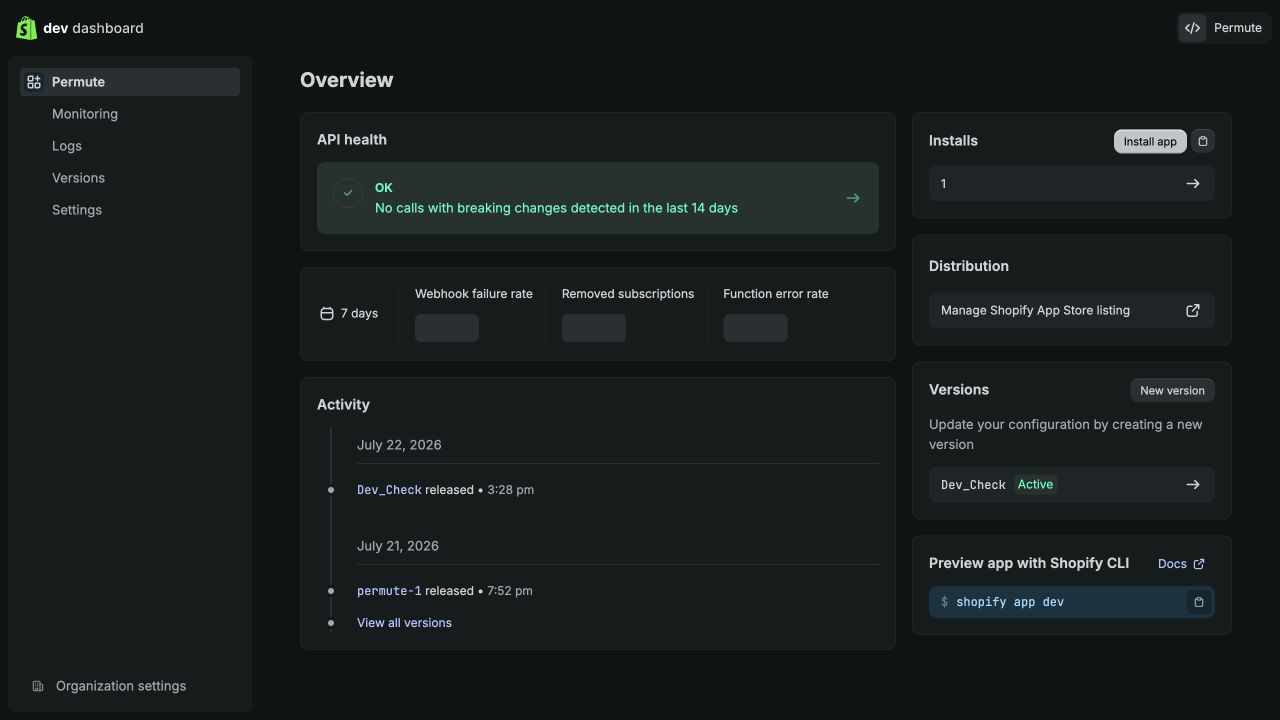
- Return to the app's Overview page.
- In the Installs card, follow the path that matches your access:
- Store owner or administrator: Select Install app.
- App developer without installation permission: Select the copy-link button beside Install app, then send the installation link to a store owner or administrator.
- On the install screen:
- Select the target store if prompted.
- Review the read permissions.
- Confirm installation.
- Return to the Dev Dashboard and confirm the installation count increased.
- The app must be installed before Permute can exchange client credentials for an access token.
- Shopify does not display a permanent Admin API token for this app type.
- Installation links expire after seven days.
- If a link expires, copy a new one from the Installs card.
4. Copy the connection details
Once installed on the store, open the app's Settings page and copy:
- Client ID
- Client secret
Treat the client secret like a password.
- Enter it only into Permute.
- Do not send it through chat, email, screenshots, tickets, or source code.
- Rotate it in Shopify immediately if it is exposed.
Copy the permanent store domain
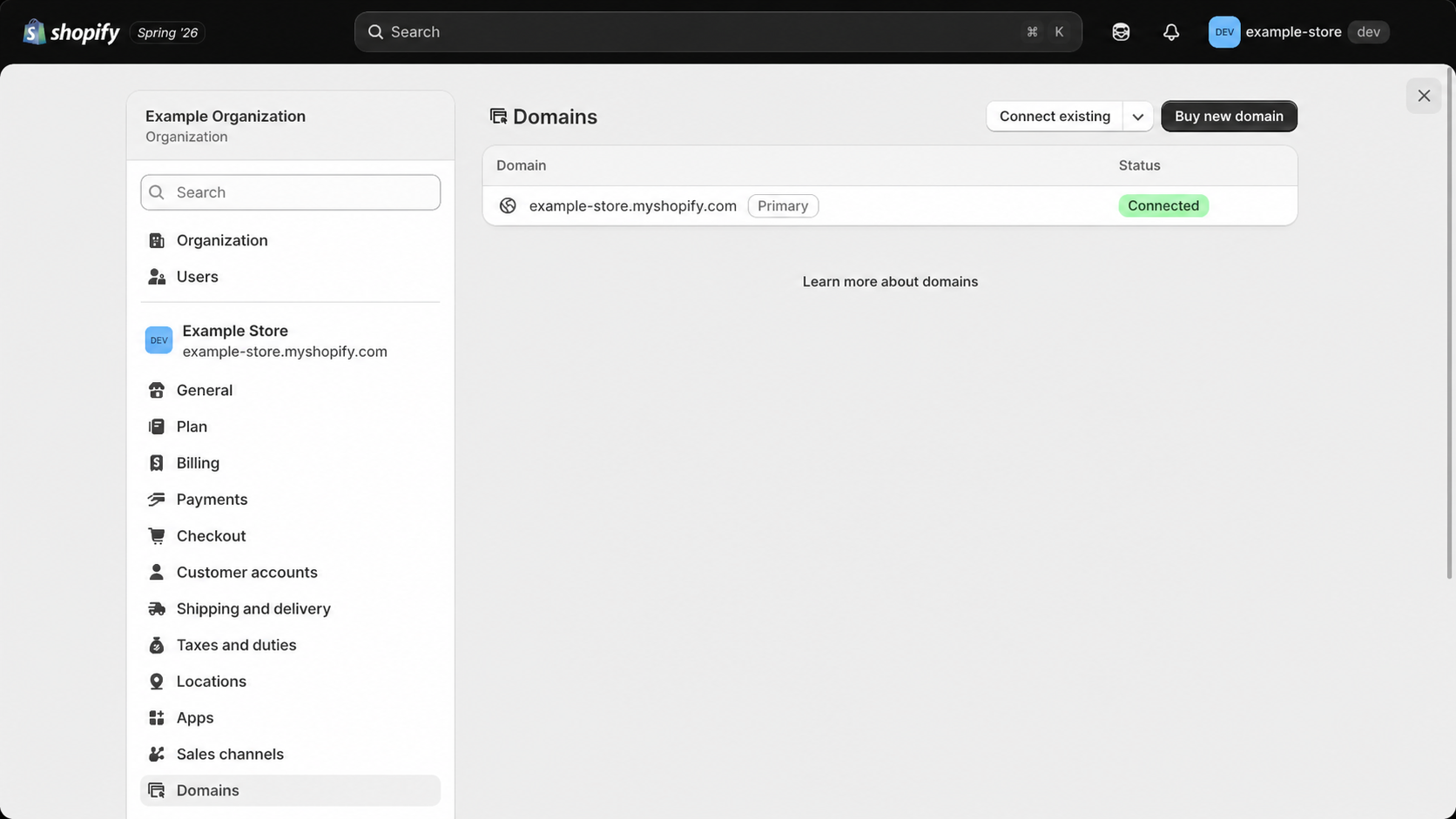
- Open Shopify Admin for the target store and select Settings.
- In the shop settings menu, select Domains.
- Find the domain ending in
.myshopify.com, such asexample-store.myshopify.com. - Copy the domain name exactly as shown.
Copy only the myshopify.com domain name. Do not include:
https://- A URL path
- An
admin.shopify.comaddress - A custom storefront domain
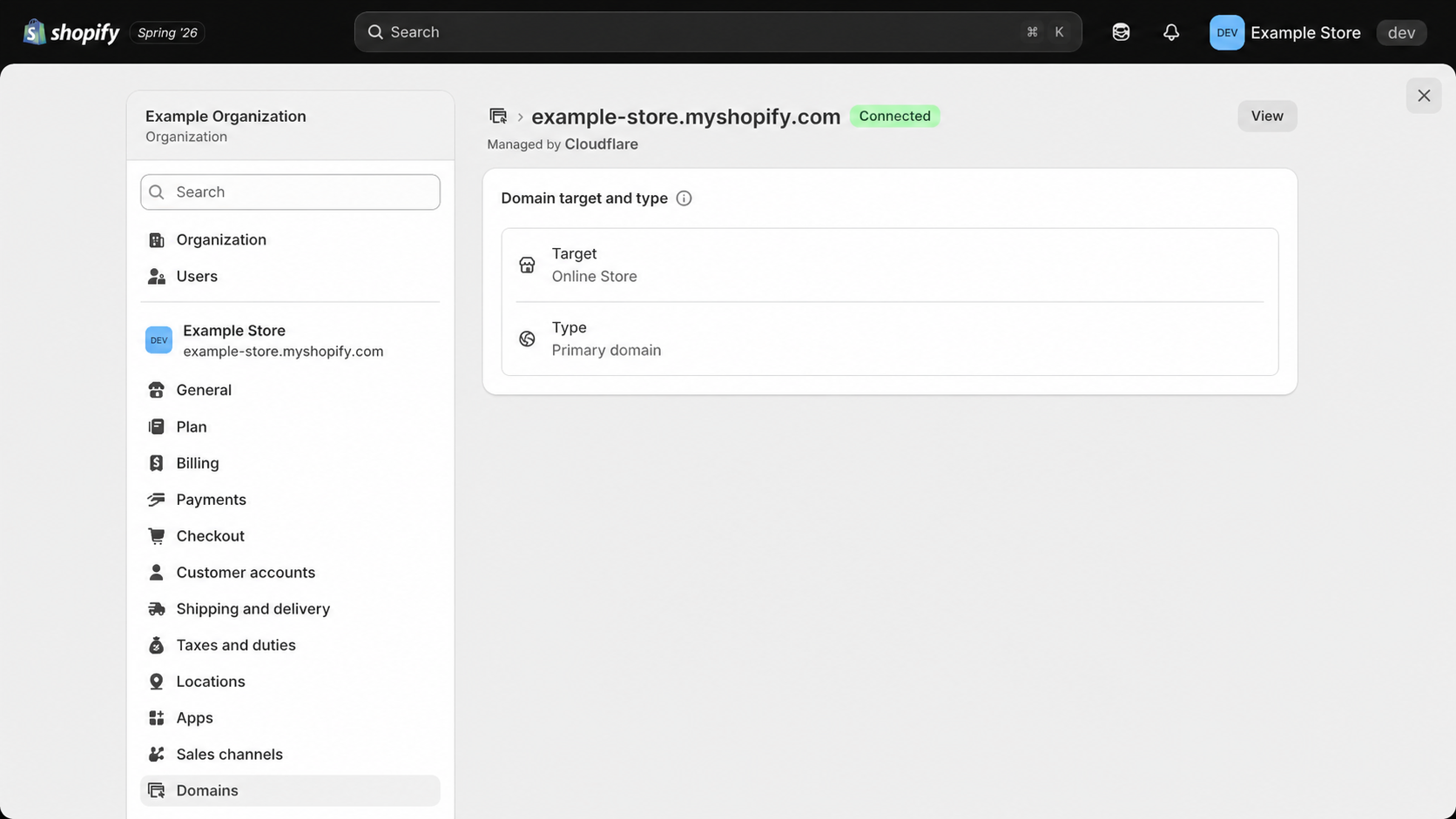
myshopify.com value from the page heading.5. Add Shopify in Permute
- Open the target Permute workspace.
- Go to Connectors and select Add connector.
- Choose Shopify.
- Enter a recognizable connector name.
- Enter the permanent Shopify store domain, Client ID, and Client secret.
- Choose what to ingest:
- Everything to ingest every table allowed by the granted scopes.
- Select manually to restrict the connector to explicitly selected tables.
- Select Connect.
Change access later
- Create a new version in the Dev Dashboard.
- Update the main Scopes field and release the version.
- Open or reinstall the app on the store to approve any added permissions.
- Run the connector again. Credentials only need replacement if you rotated the client secret.
Troubleshooting
| Message or symptom | What to check |
|---|---|
shop_not_permitted or authentication fails | The app and store are not in the same Shopify organization, or the app is not installed. |
| Invalid scopes after pasting the list | This is a Shopify display bug. Open Select Scopes, then close the popup. The error clears and the pasted scopes remain. |
| Missing required scopes | Add all five minimum scopes to the main Scopes field, release a version, and approve the update. |
| Connector succeeds but some tables are absent | The relevant expanded scope is missing, the table was not selected, or the store has no matching data. |
| Only the last 60 days of orders are visible | Add read_all_orders to the main Scopes field, release a version, and approve the update. |
| Shopify Payments access denied | Confirm all Payments scopes, Shopify Payments activation, and the installing user's payout permission. |
| A bulk query does not finish | Confirm the app is still installed and retry the connector sync. Permute cancels active operations after approximately 13 minutes so the sync can fail safely. |
Shopify references
Create apps using the Dev DashboardShopify's app creation, versioning, installation, and credential workflow.Client credentials grantOrganization ownership requirements and 24-hour access tokens.Manage access scopesThe difference between required and dynamically requested optional scopes.Shopify API access scopesCurrent Admin API scope definitions, including read_all_orders.Protected customer dataCustomer-data access rules and data-minimization requirements.Find your myshopify.com domainShopify's steps for locating the permanent store domain in Settings.