

Permute for Construction
More capacity. Less manual work.
Custom software and AI workflows across the construction and accounting systems you already use.
Built around your existing systems
Built for the way you build.
Give your team more time to estimate, manage jobs, and protect margin. Permute connects your project and accounting systems, then builds the reports and workflows that reduce rekeying, spreadsheet work, and chasing updates. Start with one problem you can measure.
Construction integrations
Your systems.
Working together.
Stop rekeying job details and chasing the latest costs. We scope and build bi-directional syncs between your project tools and accounting, with mappings and approvals built around your business. Explore a few examples below.
Example workflow
Set up the job without entering it twice.
Bring your accounting structure into the project workspace, then send approved project updates back. Give both teams a shared job number and a consistent vendor list.
Less setup work. Fewer duplicate records.
 Autodesk
Project tools

Permute
Map & sync
 Sage
SageAccounting
- To Sage
- Approved project details and mapped job updates.
- To Autodesk
- Job numbers, cost codes, and vendor records.
Agree on which system owns job numbers and vendor records.



Have a different combination? We’ll map it with you. The records, sync direction, and timing depend on your system editions and available access (including any vendor approvals).
Get in touchLess admin. More time for the job.
Start with the work that slows you down.
A weekly report. A missing change order. An estimate that needs past-job costs. We build software and AI workflows around the handoffs your team repeats every day.
See example applicationsPrepare WIP reports without the spreadsheet chase.
Bring contract values, job costs, billing, and cost-to-complete estimates into a repeatable weekly report. Apply the rules your finance team defines so they can review exceptions instead of assembling another workbook.
Give estimators the actual costs from past jobs.
Match estimate lines to completed-job costs by trade and cost code. Help estimators find comparable work and revisit assumptions without searching across old exports.
Find approved changes that haven’t been billed.
Compare approved change orders with contract and billing records. Give project managers and accounting a shared review list with the job, amount, and supporting records.
See cost overruns while there’s time to respond.
Compare budgets with posted costs and your team’s remaining-cost estimates. Surface the jobs and cost codes that cross your thresholds, with a path back to the numbers behind each flag.
What your team could see
Know what needs a closer look.
Bring budgets, estimates, and subcontractor quotes into focused workspaces. Give your team the details (and source records) to review costs and prepare the next bid.
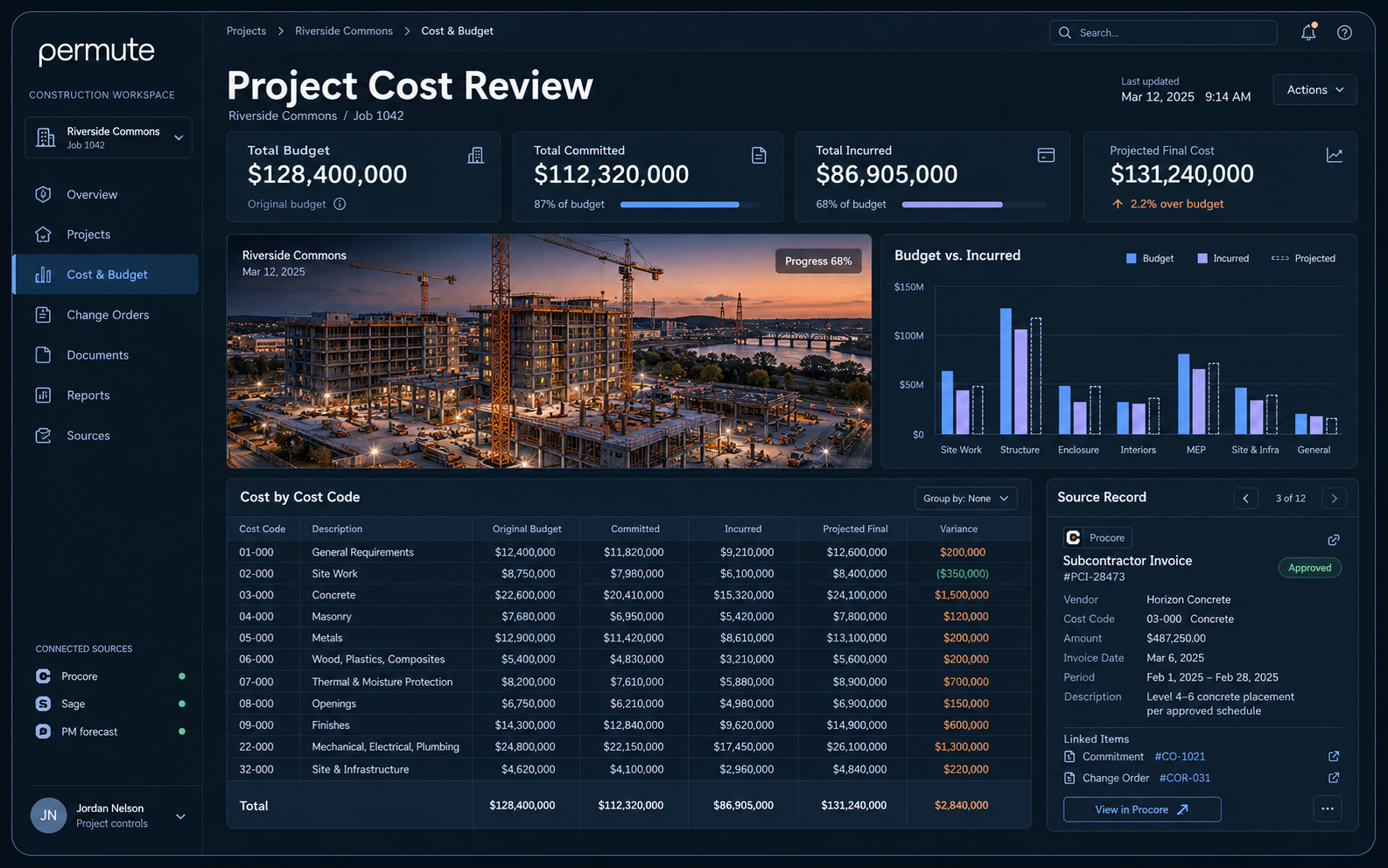
Project cost review
Spot cost variances and trace them back to budgets, invoices, and remaining-cost estimates.
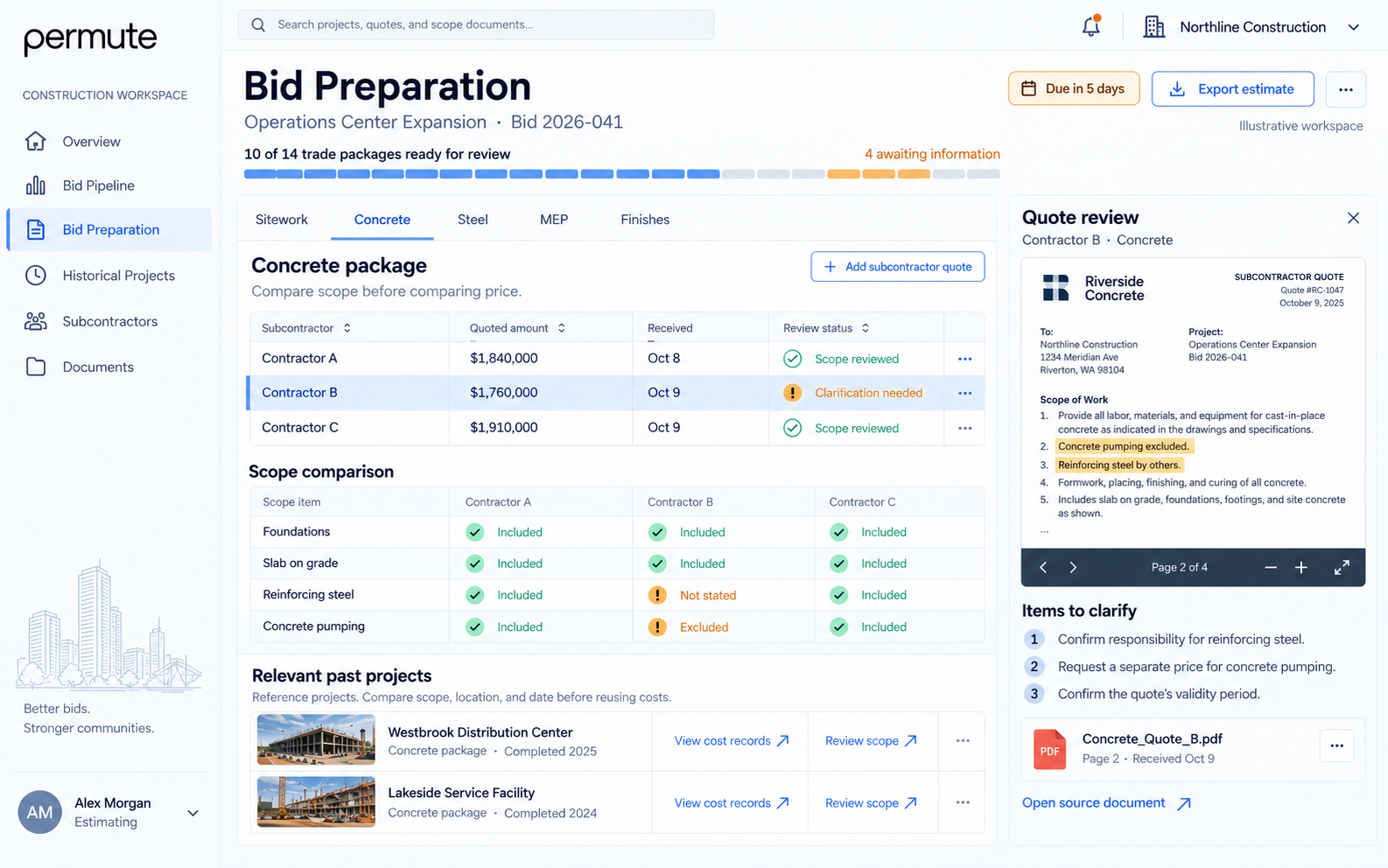
Bid preparation
Compare quotes, find scope gaps, and reuse past-project knowledge to prepare the next bid.
Illustrative application concepts with sample data. We build around your systems, reporting definitions, and review rules.
A practical first engagement
Start with one workflow.
Measure the difference.
Keep your existing tools and start with a defined scope. Your team and ours agree on the workflow, the baseline, and the measure of success before we build.
Choose the problem. Set the baseline.
Pick one report or handoff. Record the time it takes, the errors it creates, and who does the work. Agree on what a useful improvement would look like.
Measure: reporting hours, rekeyed records, or turnaround time.
Build it with the people who use it.
Our engineers connect the relevant systems and build around your rules. Check the output against source records, then train the team on the new workflow.
Validate: accuracy, exceptions, and use on real jobs.
Measure the change. Build from there.
Compare results with the baseline over agreed reporting cycles. Use what you learn to refine the workflow and decide where the next improvement belongs.
Expand: reuse the connections, definitions, and access controls.
Each improvement builds on the same Permute platform. Our engineers maintain what we launch, and your team (using its preferred development tools) can build on the same foundation.
How we work with you
Bring us the workflow that slows you down.
Tell us where your team loses time and which systems are involved. We’ll help you scope a first project with a clear measure of success.